Extract a PDF table into CSV
All 16 cells match; the comma and 90.00 total are preserved.
Completed with Codex CLI 0.163.0. This demonstrates this sample, not universal compatibility.
Start with the instructions
Read the actual pdf SKILL.md ↗
openai/skills · pinned 49f948faa9258a0c61caceaf225e179651397431
Instructions reviewed 2026-10-30. Publisher ownership and repository freshness are separate from this review and the example test.
- Good for
- Reading PDF tables and checking extracted values
- Rendering PDF pages to inspect layout
- Needs
- Python with pdfplumber; Poppler for visual inspection
- A readable PDF and an expected-value check
- Limitations
- This sample is a single text-based ruled table; OCR was not tested
- Excel-to-PDF export is not demonstrated by this walkthrough
This walkthrough uses OpenAI’s Apache-2.0 PDF skill. We inspected Anthropic’s PDF skill first; its service-specific license restricts use outside Anthropic services, so it was not used in this Codex example.
The input and actual output
Download the synthetic project and unchanged checks (ZIP). It contains no installed third-party skills. Install the pinned upstream skill separately after reviewing its license.
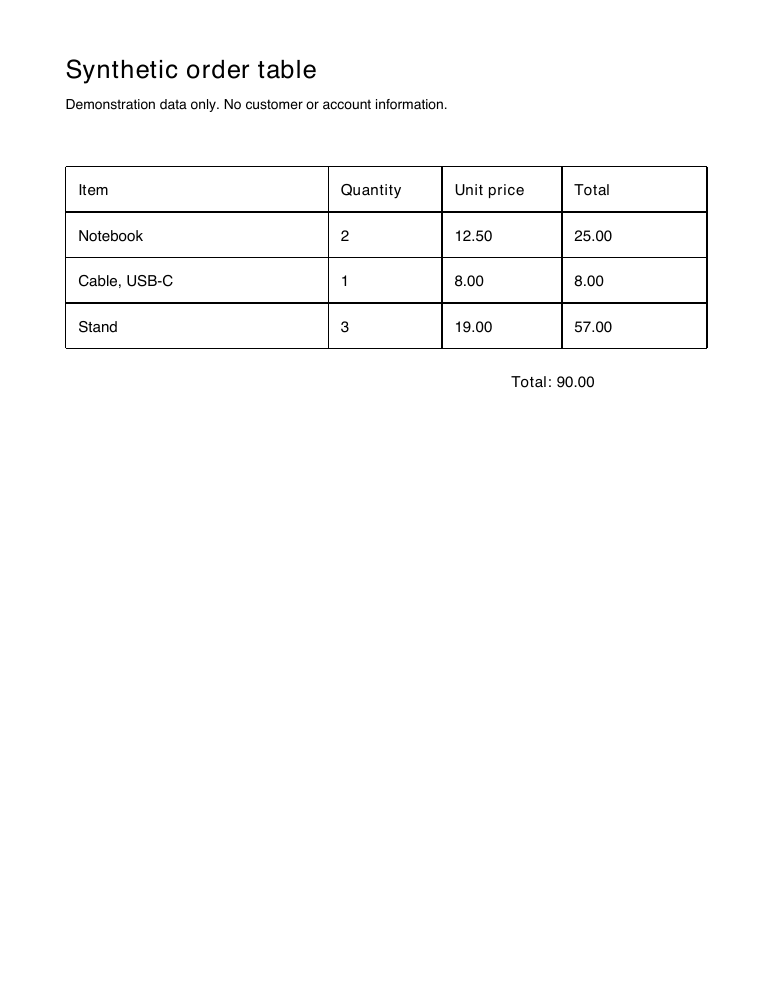
Original synthetic PDF · Actual CSV output
Inspect the actual solution: extract.py · table.csv.
Checks performed
- Four rows × four columns match expected.json exactly
- CSV retains the quoted comma and displayed decimal values
- Three data rows total 90.00; rendered page visually inspected
Test receipt, installed-file hashes and source binding (JSON)
| Runtime | Result |
|---|---|
| Codex CLI 0.163.0 | passed |
| Codex desktop | not tested — manual desktop check pending |
| Claude Code 2.1.312 | not tested — authentication unavailable |
| Claude desktop | not tested — manual desktop check pending |
Repeat it in a clean project
Unzip the input into a new directory. Use Node 24 for the JavaScript examples or Python 3 for PDF. Install only the selected source skill at the pinned revision above. Open a fresh agent session and confirm its skill list contains the installed skill; ask it to read SKILL.md before changing the input.
python3 -m venv .venv.venv/bin/pip install pdfplumber==0.11.9Install Poppler; render sample.pdf with pdftoppmAsk your agent to write extract.py and table.csv.venv/bin/python verify.py
Compare the independently checked output and hashes with the receipt. Different agent versions can produce different code; the unchanged checks define the sample’s expected behavior.
Try it with your agent
Edit the task, then use the existing guide for Codex or Claude. Copying a prompt does not install or run anything.